
Third-Party Integration Guide
Introduction
Section titled “Introduction”This document aims to explain how a third party can provide access to Pasqal quantum backends, including QPUs and potentially remote emulators to its own users. The expected architecture is cloud cross-platform connectivity. This document does not contain information related to commercial terms and pricing.
Cloud Platform
Section titled “Cloud Platform”The Pasqal Cloud Platform is a Quantum Computing-as-a-Service (QCaaS) offering that provides access to Pasqal’s neutral-atom quantum hardware and emulators without requiring any physical infrastructure management.
In the context of a third-party integration, the Cloud Platform is not directly exposed to your end users. Instead, it is used by your organisation to monitor and manage the quantum jobs submitted on behalf of your users, and to track usage for billing purposes.
You can interact with the cloud platform via:
- The User Portal: The web interface allowing you to monitor available Pasqal backends, their status and specifications; track submitted jobs and retrieve their results; and monitor usage and billing.
- Public APIs: You can implement your own client, in the programming language of your choice, to interact with the cloud platform. Full API documentation is available at the Core API reference and Open API specifications.
User Portal — Dashboard
Section titled “User Portal — Dashboard”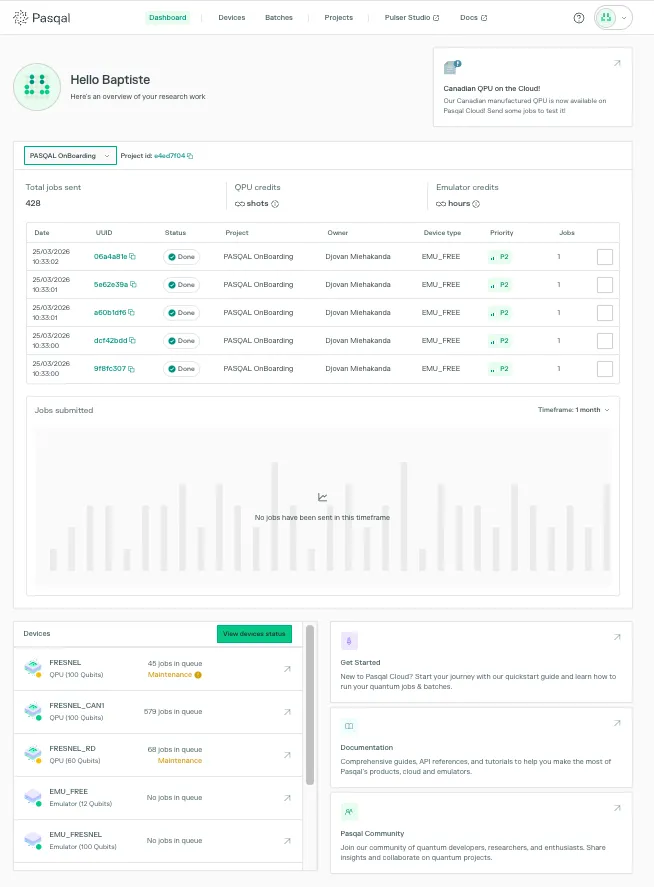
User Portal — Project page
Section titled “User Portal — Project page”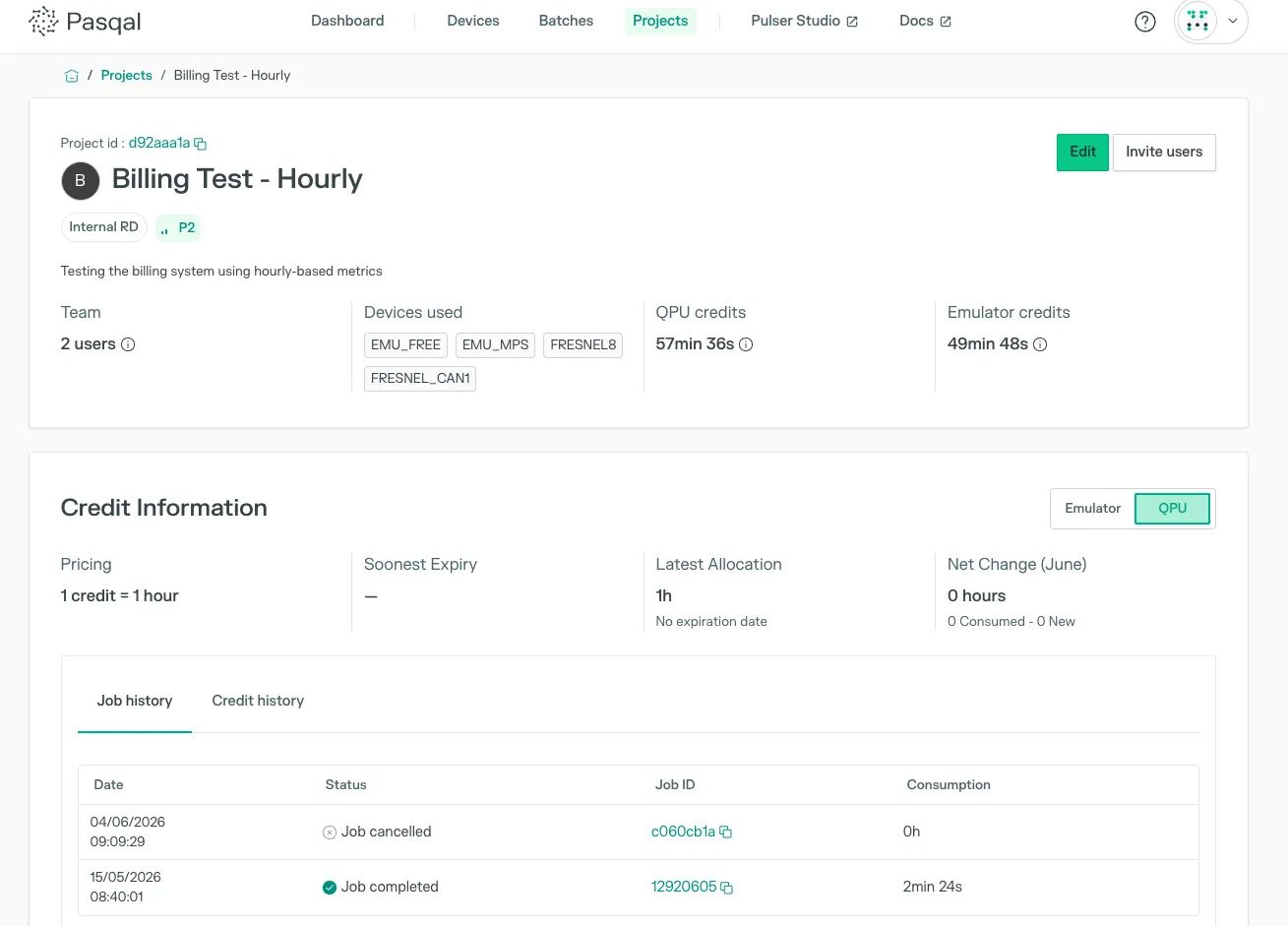
User Portal — Devices page
Section titled “User Portal — Devices page”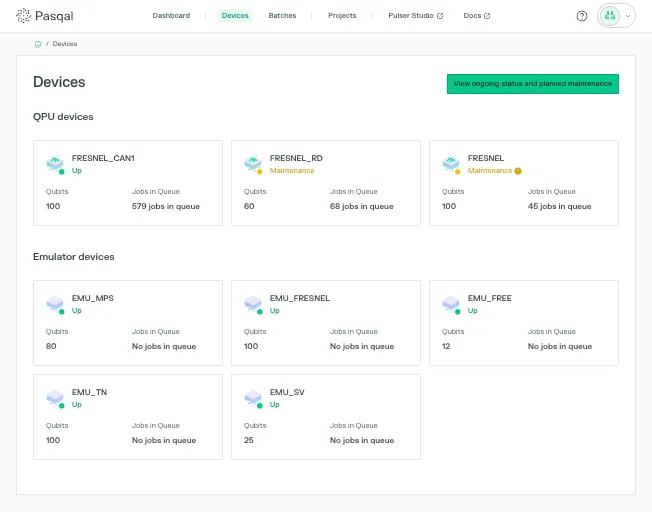
User Portal — Batch details page
Section titled “User Portal — Batch details page”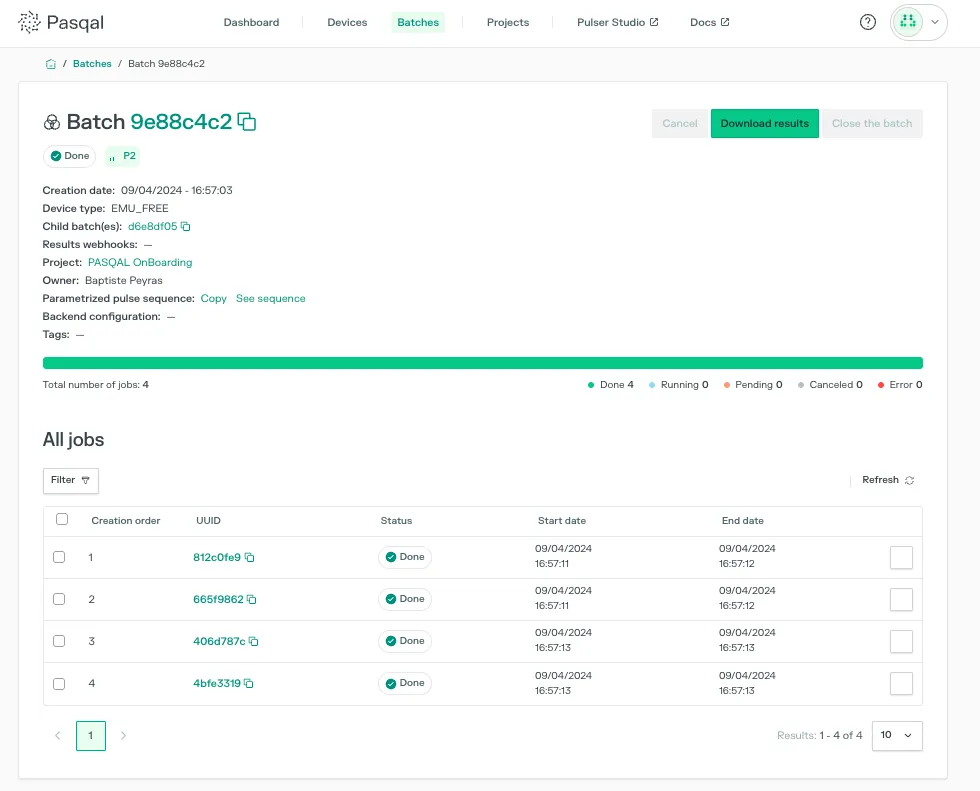
Third-Party Integration Guidelines
Section titled “Third-Party Integration Guidelines”Key Concepts
Section titled “Key Concepts”This section introduces the core concepts of the Pasqal Cloud platform.
Job & Sequence
Section titled “Job & Sequence”A Sequence is the quantum program to be executed on a backend. It is written using Pulser, Pasqal’s open-source Python library for low-level programming of neutral-atom devices. A sequence describes the pulse signals applied to the atoms, including their timing, amplitude, and phase.
A sequence is inherently tied to a Pulser Device — a specification object that defines the physical constraints of the target hardware (e.g. number of qubits, supported pulse channels, and layout). A sequence is only valid if it complies with the specifications of its associated device. For more details on devices and how to work with them, refer to the Pulser documentation.
A Job is a single execution request built on top of a sequence. It adds a number of runs (also called shots) — each run being one independent execution of the sequence, returning a bitstring as output. Multiple runs are necessary to build a statistically meaningful distribution of results.
A job goes through the following statuses during its lifecycle:
PENDING → RUNNING → DONE or ERROR
A job can also be CANCELED at any point before it completes.
A batch is a collection of jobs submitted to the same backend. Grouping jobs into batches is the recommended approach on Pasqal Cloud — it optimises queue management and allows bulk actions such as downloading all results or cancelling multiple jobs at once. A batch is capped at 1,000 jobs and follows the same status lifecycle as individual jobs (PENDING → RUNNING → DONE).
When a batch reaches the top of the backend queue and the backend is idle, the backend is reserved for this batch, and all its jobs are executed sequentially in submission order. A batch can be cancelled entirely, removing it from the queue if it has not yet started, or cancelling all remaining pending and running jobs otherwise.
For variational algorithms, where the parameters of future jobs depend on the results of previous ones, Pasqal Cloud supports Open Batches. Unlike a standard batch — where all jobs must be defined upfront — an open batch allows new jobs to be added dynamically while the batch is still PENDING or RUNNING. The backend remains reserved for the open batch throughout this process. Once all jobs have been submitted, the batch must be explicitly closed to release the backend for the next batch in the queue.
Project
Section titled “Project”A Project is a scoped collaboration between Pasqal and your organisation. All activity on the platform — submitting jobs, monitoring executions, accessing results — takes place within the context of a project. A project is identified by a unique project_id, which is required to submit jobs and interact with the platform.
Billing
Section titled “Billing”As a third-party integration partner, your usage of Pasqal Cloud operates on a pay-as-you-go basis. Your consumption is tracked at the job level and communicated back to you for invoicing.
Usage is billed based on the total execution duration of the jobs of your project. Your consumption is recorded upon job completion and reported accordingly.
Connection
Section titled “Connection”A Connection is the component that allows your users to authenticate through your own identity provider and access Pasqal Cloud services through your middleware. To enable the portability of quantum SDKs and applications to your infrastructure, Pasqal recommends implementing a dedicated connection that inherits from the RemoteConnection interface defined in the Pulser Python package.
Backend & Remote Backend
Section titled “Backend & Remote Backend”A backend is the execution target for quantum computations. Pasqal Cloud provides access to two types of backends:
- QPU (Quantum Processing Unit) — The physical quantum hardware. Jobs submitted to the QPU are executed on a real neutral-atom quantum computer.
- Emulators — Software simulators of the QPU, useful for development and testing before running on real hardware. Pasqal currently offers:
- EMU_FREE — A lightweight emulator for small quantum systems, available at no cost.
- EMU_MPS — A GPU-accelerated tensor-network emulator, suited for systems of up to 100 qubits.
- EMU_SV — A state-vector emulator providing precise simulation results for systems up to ~25 qubits, ideal for benchmarking and testing quantum algorithms.
A RemoteBackend is the Pulser interface through which jobs are submitted to a backend over a remote connection. No implementation is required on your side — the available RemoteBackend classes are provided across two repositories: QPUBackend in the Pulser GitHub repository, and RemoteMPSBackend, RemoteSVBackend and RemoteQutipBackend in the Pasqal Cloud GitHub repository. Your users simply need to instantiate the relevant backend with the Connection you have implemented, and jobs will be routed through your middleware to Pasqal Cloud.
See the code example in the appendices for a concrete illustration of how the Connection and RemoteBackend interact.
Access to Pasqal-hosted emulators can be enabled or disabled for your integration. Additionally, you have the option to distribute and run Pasqal’s emulators on your own infrastructure. In that case, your middleware is responsible for intercepting incoming requests and re-routing them to your own emulator instances when an emulator backend is specified.
Integration Requirements
Section titled “Integration Requirements”Integrating with Pasqal Cloud requires implementing a set of components on the third-party side, namely, a remote connection and a middleware service. As Pasqal does not store or manage any third-party user data, the third party is responsible for handling user management and data isolation. Pasqal provides documentation and support throughout the process to facilitate the integration.
API Reference
Section titled “API Reference”Pasqal Cloud is publicly exposed via an HTTP API under the domain apis.pasqal.cloud. The third-party relevant API specifications are described using OpenAPI standards. A full documentation of our APIs is also available at the Core API reference.
All third parties integrating with Pasqal Cloud can use those OpenAPI specifications to automatically generate an HTTP client in the programming language of their choice.
Authentication
Section titled “Authentication”As part of the onboarding process, Pasqal will provision a dedicated service account for your organization and share its credentials securely via Keeper. These credentials are intended for machine-to-machine (M2M) interactions only — they must be used exclusively by your middleware to authenticate requests to Pasqal Cloud on behalf of your users, and must never be exposed to end users.
A project will be created on Pasqal Cloud for your organisation. Your internal team members will be invited to this project with personal credentials, allowing them to access the Cloud Platform directly — for example, to monitor jobs, track usage, and manage billing. The service account will also be added as a member of this project to enable M2M interactions from your middleware.
The credentials are described by the following JSON schema:
{ "$schema": "http://json-schema.org/draft-07/schema#", "type": "object", "properties": { "client_id": { "type": "string" }, "client_secret": { "type": "string" } }, "required": ["client_id", "client_secret"], "additionalProperties": false}Pasqal Cloud supports the Client Credentials flow as per RFC-6749. Authentication is managed and operated by Okta Auth0. Access tokens generated with the client credentials have a lifetime of 24 hours. Since access tokens are valid for 24h, Pasqal limits service accounts to generate 100 tokens per day.
Client credentials can be rotated at any time by sending a request to Pasqal support at help@pasqal.com. In case of compromised secrets, the third party can also request deactivation of the service account and the issuance of a new client_id / client_secret pair.
Remote Connection Implementation
Section titled “Remote Connection Implementation”To integrate with Pasqal Cloud, you must implement a dedicated ThirdPartyConnection that inherits from the RemoteConnection class in the Pulser Python package and implements its abstract methods.
An important thing to consider: the connection does not communicate directly with Pasqal Cloud services. Since Pasqal does not manage third-party users, all requests from the connection must go through the third party middleware, which is responsible for handling user identity and forwarding requests to Pasqal Cloud on their behalf.
The only exception is Pasqal’s public endpoints, which require no authentication and can be called directly from the connection if needed (e.g. fetching available device specifications).
For reference, here are existing implementations you can draw inspiration from:
- pasqal-cloud — Direct connection to Pasqal Cloud
- pulser-azure — Access through Azure Quantum
- pulser-scaleway — Access through Scaleway QaaS
Any Pulser-compatible tutorial or example will work with your connection implementation with minimal changes — simply swap the PasqalCloudConnection object for your own ThirdPartyConnection, as demonstrated in the QUBO solver tutorial.
Middleware service implementation
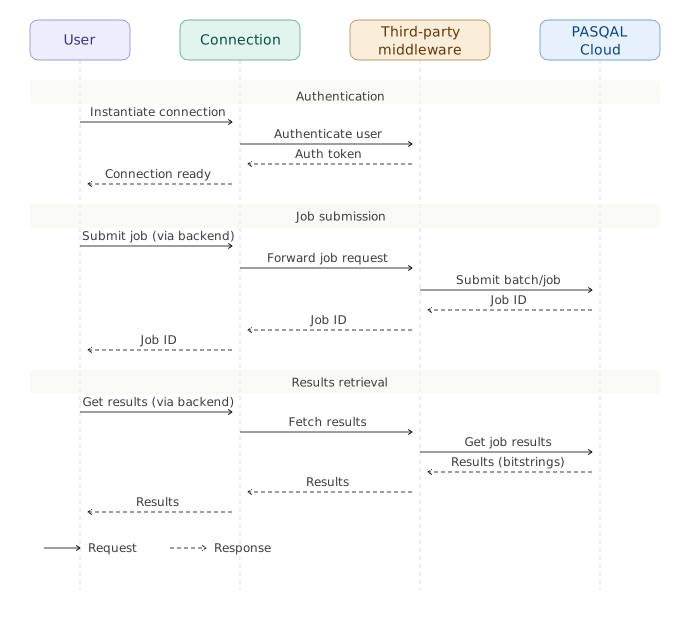
Section titled “Middleware service implementation”The middleware service is the component responsible for handling all interactions between your users and Pasqal Cloud. It handles user authentication and forwards their requests to Pasqal Cloud. It also tracks the mapping between job IDs returned by Pasqal Cloud and your own users. Since Pasqal Cloud has no knowledge of your users and reports usage at the job level only, your middleware is responsible for maintaining this association in order to generate accurate per-user usage reports and bill your users accordingly.
The following diagram illustrates an example of an end-to-end interaction flow between a user, the Connection, your middleware, and Pasqal Cloud.
Billing
Section titled “Billing”Pasqal Cloud platform will provide a dedicated project to the third party and securely share its id via Keeper. All the customer data, including quantum jobs and results, will be logically attached to this project. This project will be logically separated from other Pasqal customers or third parties data since they are part of different projects.
At the end of every month, Pasqal will send a complete report along the invoice corresponding to the amount of backends processing time the third party consumed by quantum jobs which ended during the month. A complete example report is found in the appendices. The default format for the report is csv and the frequency of generation is the month.
The report pricing is time based with the following example quotes:
- QPU (FC1, FM2,…): 3,000€ per hour
- Emulators with gpu acceleration (EMU_MPS, EMU_SV): 15€ per hour
- EMU_FREE: Free (0€ per hour)
The third party is responsible for billing the end users for their respective usage. To do so, job IDs should be stored by the third-party middleware and mapped to a given user.
Project Management
Section titled “Project Management”Since integrating Pasqal Cloud platform includes various parts and requires some understanding of both quantum software and cloud systems, we highly recommend the technical integration project to have the following schedule with clear mutual validation at each steps.
Phase 1: Preliminary test
Section titled “Phase 1: Preliminary test”- Pasqal shares the credentials client_id/client_secret to the third party
- Pasqal creates a project and shares the project_id to the third party
- The third party sends a first dummy quantum job to the QPU and asserts the result. The typical quantum job is detailed in the appendices.
- Pasqal and the third party both validate a successful execution of the test
Phase 2: Middleware implementation
Section titled “Phase 2: Middleware implementation”- The third party exposes Pasqal QPU on its own platform. During this phase, Pasqal remains in support to ease the implementation.
- To natively benefit from Pasqal analog software stack in the third party cloud ecosystem and infrastructure, we highly recommend to implement a RemoteConnection specific to API exposed by the third party to its users.
- Pasqal and the third party both validate successful execution of the same test defined in Phase 1 but this time going through the third party infrastructure.
Phase 3: Billing validation
Section titled “Phase 3: Billing validation”- The third party sends various quantum jobs and tracks the usage
- Pasqal sends the billing report at the end of the month
- Pasqal and the third party both validate the report
Security & Compliance
Section titled “Security & Compliance”Customer data is stored:
- quantum and platform data in the Google Cloud Platform data center in the Paris region (eu-west-9).
- authentication data (i.e. service account) is stored on the Okta Auth0 European tenant.
Data in transit is guaranteed to require at least TLS1.2+ and data at rest is encrypted with AES-256.
Appendices
Section titled “Appendices”Billing report example
Section titled “Billing report example”Job by Job
Section titled “Job by Job”| Job ID | Start Time | End Time | Time (h) | Backend | Price (€) | Job Status |
|---|---|---|---|---|---|---|
| 90fff98b | 01/03/2026 10:14 | 01/03/2026 10:20 | 0.60 | FC1 | 1800 | Done |
| 2a1c3d11 | 04/03/2026 14:02 | 04/03/2026 14:38 | 0.82 | EMU_MPS | 12 | Done |
| b3d85e3a | 11/03/2026 09:18 | 11/03/2026 10:07 | 1.42 | EMU_FREE | 0 | Done |
Overview
Section titled “Overview”| Total QPU time (h) | Total EMU Time (h) | Total Price (€) |
|---|---|---|
| 3 | 10 | 9150 |
Job submission code snippet
Section titled “Job submission code snippet”Code snippet to validate proper job submission to Pasqal Cloud platform:
import numpy as np
from pasqal_cloud import RemoteMPSBackend, PasqalCloudConnectionfrom pulser import Pulse, QPUBackend, Sequenceimport pulserfrom pulser.backend.remote import BatchStatusfrom pulser.waveforms import InterpolatedWaveformfrom pulser.backend import BitStrings, EmulationConfigfrom pulser.register import TriangularLatticeLayout
def build_sequence(device):    reg_layout = TriangularLatticeLayout(60, 5.0)    Omega_max = 0.8 * 2 * device.rabi_from_blockade(5.0)  # Spacing between atoms    U = Omega_max / 2.0    T = 2  # us
    interpolated_pulse = Pulse(        InterpolatedWaveform(            T * 1000,            U * np.array([1e-9, 0.16768532, 0.2, 0.2, 1e-9]),            times=np.linspace(0, 1, 5),        ),        InterpolatedWaveform(            T * 1000,            U * np.array([-1.0, -0.54656236, 0.05762063, 0.3673201, 1.0]),            times=np.linspace(0, 1, 5),        ),        0,    )
    reg = reg_layout.define_register(21, 26, 35, 39, 34, 25)    N_atoms = len(reg.qubits)    print("Contains ", N_atoms, "atoms")
    seq = Sequence(reg, device)    seq.declare_channel("ising", "rydberg_global")    seq.add(interpolated_pulse, "ising")    return seq
def send_sequence_to_emu_mps(connection, sequence):    # Send the sequence to the EMU_MPS backend    backend = RemoteMPSBackend(        sequence,        connection,        config=EmulationConfig(observables=[BitStrings(num_shots=1000)]),    )    result = backend.run(job_params=[{}])    return result.batch_id
def send_sequence_to_qpu(connection, sequence):    # Send the sequence to the QPU    backend = QPUBackend(sequence, connection)    result = backend.run(job_params=[{"runs": 100}])    return result.batch_id
def fetch_results(connection, batch_id):    remote_results = pulser.backend.RemoteResults(batch_id, connection)    if remote_results.get_batch_status() != BatchStatus.DONE:        print("\n  Batch is not DONE yet.")        return None    results = remote_results.results[0]    print(results)    return results
def main():    connection = PasqalCloudConnection(        username="username",        project_id="project_id",    )    qpus = connection.fetch_available_devices()    qpu_name = "FRESNEL_CAN1"    fresnel_can = qpus[qpu_name]
    sequence = build_sequence(fresnel_can)    batch_id = send_sequence_to_emu_mps(connection, sequence)    # batch_id = send_sequence_to_qpu(connection, sequence)    print("batch_id", batch_id)    # fetch_results(connection, batch_id)
if __name__ == "__main__":    main()