Local Adressability with DMM
import numpy as np
from dataclasses import replace
from matplotlib import pyplot as plt
from pulser.devices import WeightedAnalogDevicefrom pulser.register import Registerfrom pulser.register.register_layout import RegisterLayoutfrom pulser.register.mappable_reg import MappableRegisterfrom pulser.sampler import samplerfrom pulser.sequence import Sequencefrom pulser.pulse import Pulsefrom pulser.waveforms import ConstantWaveform, RampWaveform
Introduction
Section titled “Introduction”Even when working with global addressing channels, the detuning of individual qubits can be addressed locally by using a specific channel named the Detuning Map Modulator or DMM.
This Channel applies a Global pulse of zero amplitude and negative detuning on a DetuningMap. The DetuningMap consists of a set of weights on specific sites that dictate the proportion of detuning applied by the DMM each site receives.
This modulation of the DetuningMap by the DMM Channel is equivalent to adding a term to the Ising Hamiltonian. Here, is the detuning applied on the DMM, and are the weights defined in the DetuningMap for each atom.
The inclusion of this term results in the Weighted-Analog Ising Hamiltonian:
Define a Detuning Map
Section titled “Define a Detuning Map”A DetuningMap associates a set of locations with a set of weights. The locations are the trap coordinates to address and the weights have to be between 0 and 1.
trap_coordinates = [(0.0, 0.0), (0.0, 5.0), (5.0, 0.0), (5.0, 5.0)]weights = [1.0, 0.5, 0.5, 0] # between 0 and 1The DetuningMap can be defined from a RegisterLayout, a Register or a MappableRegister by using the define_detuning_map method. All it takes is a mapping between trap/qubit IDs and weights.
register_layout = RegisterLayout(trap_coordinates)detuning_map = register_layout.define_detuning_map(    {i: weights[i] for i in range(4)}  # mapping between trap IDs and weights)
map_reg = MappableRegister(register_layout)det_map_from_map_reg = map_reg.define_detuning_map(    {i: weights[i] for i in range(4)}  # mapping between trap IDs and weights)
register = Register.from_coordinates(    trap_coordinates, center=False, prefix="q")det_map_from_reg = register.define_detuning_map(    {        f"q{i}": weights[i] for i in range(4)    }  # mapping between qubit IDs and weights)
detuning_map.draw(labels=[0, 1, 2, 3])assert detuning_map == det_map_from_map_regassert detuning_map == det_map_from_reg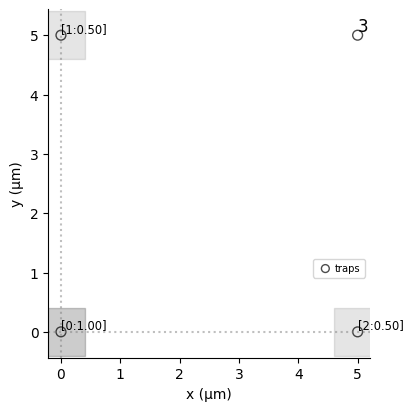
The traps are represented by a grey dot and highlighted by a grey square, whose shade is proportional to the value of the associated weight. It is possible to display the value of the weights by specifying a list of labels. If the weight is null then no DMM is applied: the atom is not highlighted by a grey square and the value of the weight is not shown when labels are specified.
DMM Channel and Device
Section titled “DMM Channel and Device”A DMM Channel is a Channel that accepts pulses of zero amplitude and detuning below 0 and above:
bottom_detuningfor each site.total_bottom_detuningfor the total detuning distributed among the atoms.
The DMM channels are defined separately from the other channels of the device. They are defined as a list in dmm_objects. They can be accessed via the property dmm_channels of the device, where an ID is automatically associated to each DMM with the format dmm_{index of appearance in dmm_objects}.
pulser.devices.AnalogWithDMMDevice is an example of a device containing one DMM channel, accessible via the ID dmm_0:
print(WeightedAnalogDevice.dmm_channels)
{'dmm_0': DMM(clock_period=4, min_duration=16, max_duration=100000000, mod_bandwidth=22, eom_config=None, bottom_detuning=-62.83185307179586, total_bottom_detuning=-6283.185307179586, min_avg_abs_detuning=0.6283185307179586)}
DMM in a Sequence
Section titled “DMM in a Sequence”In a Sequence defined with a Device having dmm_objects, the DMM channels can be configured using config_detuning_map. This configuration associates a DMM - referenced by dmm_id in the Device- with a DetuningMap, under a dmm_name in the Sequence.
seq = Sequence(register, WeightedAnalogDevice)seq.config_detuning_map(detuning_map, "dmm_0")print(seq.declared_channels)
{'dmm_0': DMM(clock_period=4, min_duration=16, max_duration=100000000, mod_bandwidth=22, eom_config=None, bottom_detuning=-62.83185307179586, total_bottom_detuning=-6283.185307179586, min_avg_abs_detuning=0.6283185307179586)}
Let’s now apply a global detuning on the detuning map. This is done by calling add_dmm_detuning and providing a waveform (the detuning to modulate the DetuningMap with) and the dmm_name to use (provides the DetuningMap and checks that is in agreement with the characteristics of the corresponding DMM).
seq.add_dmm_detuning(ConstantWaveform(100, -10), "dmm_0")seq.draw(draw_detuning_maps=True)

Once a detuning map is configured, it is no longer possible to define a Microwave channel. However, it is possible to declare Rydberg and Raman channels. Let’s declare a Rydberg.Global channel in our sequence.
seq.declare_channel("ryd_glob", "rydberg_global")Be careful with the protocols that are used to add the pulses to Channels and DMM:
The default protocol to add a waveform to a
DMMis"no-delay", meaning that it will be added straight after the last pulse, without caring about the other channels. As an example, the second waveform added todmm_0below starts at the end of the first waveform added todmm_0(at t=100 ns) and not after the pulse added to the Global Rydberg channel (which finishes at t=152 ns), which would have been the case with the protocol"min_delay". The protocol can be changed to other values by defining theprotocolargument.The protocol to add a pulse to a
Rydbergor aRamanchannel is"min-delay", meaning that the pulse will by default be added after the end of the pulse of aDMM. It can be switched to"no-delay".
seq.add( Pulse.ConstantPulse(152, 10, 2.5, 0), "ryd_glob", protocol="no-delay") # added at the beginning with protocol "no delay"seq.add_dmm_detuning(RampWaveform(200, -10, 0), "dmm_0") # added at t=100seq.add( Pulse.ConstantPulse(100, 5, 0, 0), "ryd_glob", protocol="no-delay") # added at t=150 after the last pulse on `ryd_glob`, with protocol "no-delay"seq.draw()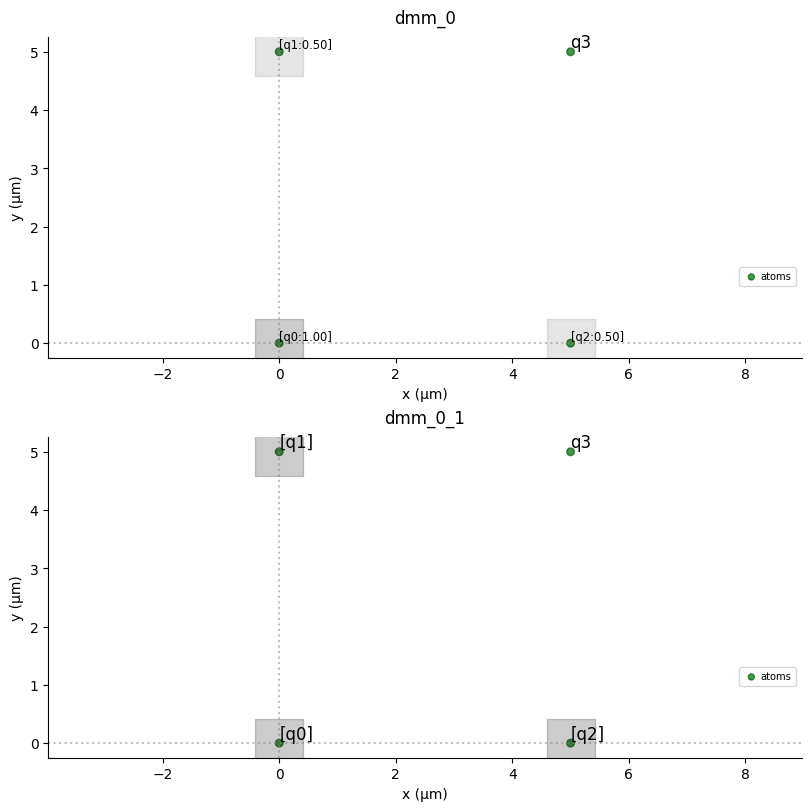
It is possible to display the amplitude and detuning per qubits, by setting to True the arguments draw_qubit_amp and draw_qubit_det. This adds two plots after the drawing of the sequence. The first one shows the evolution of these quantities along time for groups of qubits experiencing the same amplitude or detuning. The second represents these group of qubits on a register.
seq.draw( mode="input+output", # "input" only shows input signals, "input+output" draw_qubit_det=True, draw_qubit_amp=True,)


You can see that by combining a global pulse with a positive detuning and a pulse on the DMM channel, it is possible to have positive local detuning (see the detuning on q3 from t=0 to t=152 ns).
It can also be noted that from t=100 ns to t=300 ns, the local detuning is defined by the detuning ramp applied on detuning_map, hence it is locally a detuning ramp, going to 0 with a slope defined by the weight of detuning_map on each atom. This is why the detuning on q3 during this duration is equal to the one of the global Rydberg’s channel and that q1 and q2 have the same local detuning (they are part of the same “target” group for the detuning).